Gaming Clip Makers in 2026: What To Look For
Updated
Short answer: what gaming clipping needs
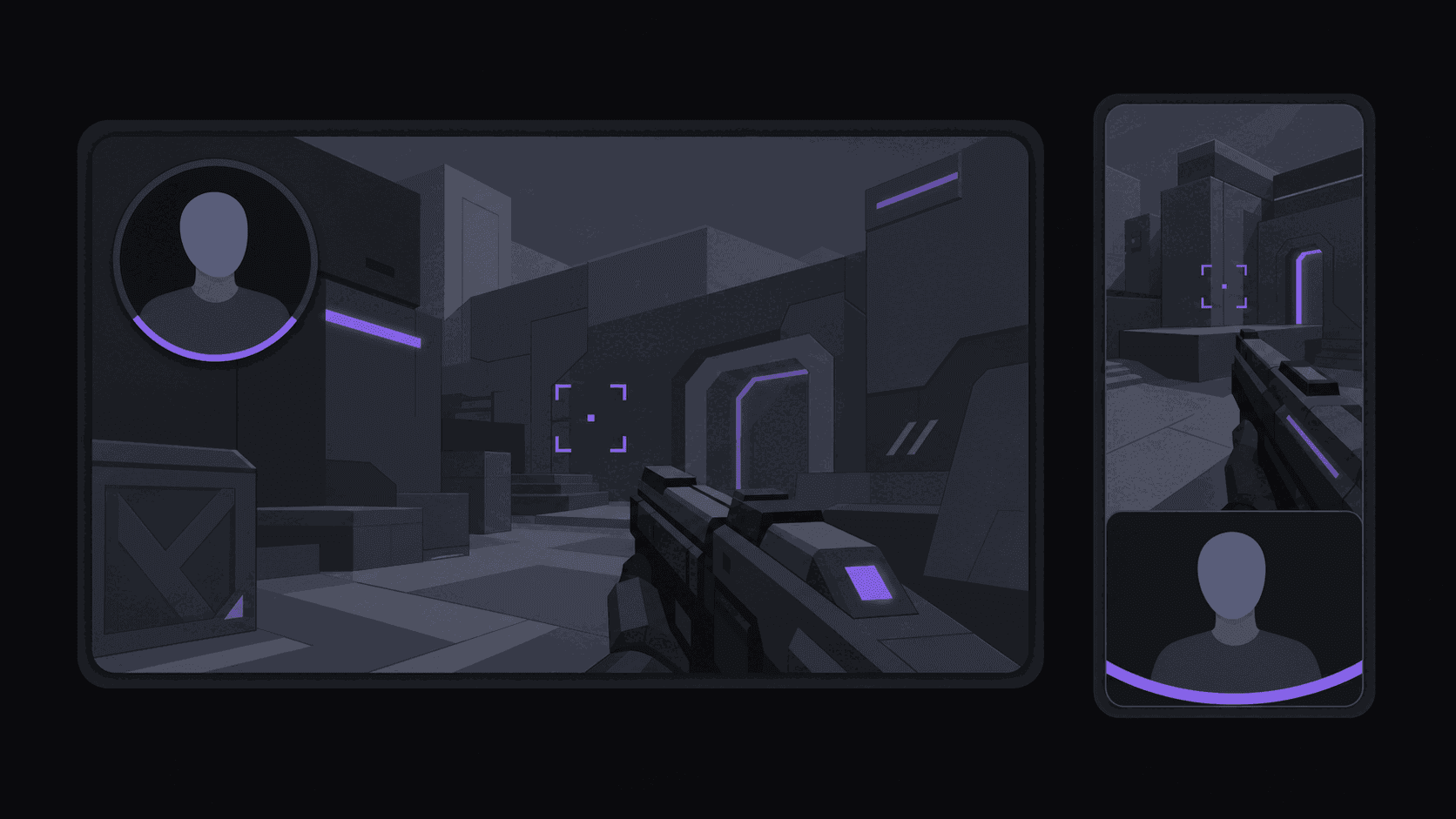
A gaming clip maker has to keep the facecam and the gameplay both on screen and cut on the reaction, which is exactly what transcript-only selection and face-tracking reframing get wrong.
The second problem is length: streams are hours, not minutes, and cost usually scales with source duration. AutoClip charges 1 credit per source minute and accepts sources up to 2, 5 or 10 hours by plan, so plan choice for streamers is really a source-length decision.
Key takeaways
Picking a plan for stream lengths
Match the plan to your usual stream, not to your best month.
| Typical stream | Fits Starter (2 h) | Fits Pro (5 h) | Fits Scale (10 h) |
|---|---|---|---|
| 90-minute session | Yes | Yes | Yes |
| 4-hour stream | No | Yes | Yes |
| 8-hour marathon | No | No | Yes |
| 12-hour subathon | No | No | Split the VOD first |
Why Gaming Breaks Tools That Work Fine On Podcasts
A gaming clip channel looks identical to a podcast clips channel from the outside. Underneath, three things make it harder.
The sources are enormous. A Twitch stream runs four to eight hours. Scrubbing that by hand to find a 30-second clutch is most of an afternoon, and you are probably watching five streamers, not one.
The moments are not always loud. Podcast clipping rewards emotional intensity, and plenty of gaming clipping does too. But some of the best gaming moments are quiet — a clean play, a perfectly timed line, a reaction that lands because the room went silent. A tool that only chases volume spikes finds the shouting and misses the rest.
And the framing problem is genuinely harder. The game fills most of the screen; the streamer sits in a corner box. Crop to the game and you lose the face that makes the clip funny. Crop to the face and you lose the play that makes it impressive. Both halves are load-bearing.
If a tool cannot handle those three things, its podcast demo tells you nothing about how it will do on your VODs.
The Framing Question, Answered Properly
This is the single biggest quality difference between gaming clipping tools, so test it first with a real VOD from a streamer you actually clip.
Static center crop. Cuts the middle out of the wide frame. On a layout with the facecam bottom-left, it deletes the streamer entirely. Fast, cheap, usually wrong.
Face-only tracking. Keeps the streamer centered the whole time. Good for a talking-head segment, bad for the clutch, because the reason anyone would watch is now off-screen.
Game-only framing. The mirror image. You keep the play and lose the reaction.
A split layout. Both regions stacked in the vertical frame so the play and the face are visible at once. For most gaming content this is what you want, and it is what AutoClip produces for gaming sources — the game stays readable, the facecam stays in shot, and the viewer sees the reaction happen against the thing causing it.
Judge this by watching output, not by reading feature lists. Our reframe glossary entry explains what subject tracking is doing. Every tool claims smart reframing. Ten seconds of a real clip will tell you whether it works on your layout.
Cost, Honestly, For Multi-Hour Streams
Long sources are where clipping tools get expensive, and it is worth doing the arithmetic before you commit.
AutoClip bills in credits where 1 credit equals 1 source minute — but livestreams are the exception. Only the top highlight segments of a Twitch or Kick VOD bill, so a multi-hour stream typically costs between 35 and 90 credits rather than the several hundred a straight minute count would imply.
Run the numbers against the plans. Starter at $19.99/month carries 200 credits, one monitored channel, three social accounts, six clips per video and sources up to two hours — which rules out most full streams, so gaming clippers usually start higher. Pro at $39.99/month is 500 credits, three monitored channels, eight social accounts, twelve clips per video, five-hour sources, and adds B-roll, music, sound effects and spoken hooks. Scale at $79.99/month is 1200 credits, ten monitored channels, fifteen clips per video, ten-hour sources, 4K export and priority processing.
For a gaming operation, the source-length limits tends to bind before the credit balance does. Check it against how long your streamers actually go live.
The Workflow That Makes It Sustainable
Connect a Twitch, Kick, or YouTube channel and stop thinking about it. When a stream ends and its VOD appears, clipping starts on its own.
What comes back: vertical clips with the split layout, word-synced captions in styles that read cleanly over busy gameplay, and a virality score with a five-criterion breakdown so you can see the reasoning rather than a bare number. Turnaround is about five minutes for a typical video; a five or six-hour stream takes proportionally longer, which is still a fraction of a manual pass.
Your job is the queue — the gaming clipper workflow in full. Skim, reject the ones that missed, and post. Approved clips go out to your connected accounts across 9 destinations on the spacing you configure — though note that Twitch itself is not a posting destination, only a source.
One honest caveat. On chaotic footage with heavy overlays, alerts, and multiple camera boxes, more clips will need a look than on a clean two-person podcast. That is the nature of the material. Budget a slightly longer approval pass for gaming than a podcast clipper would.
Frequently Asked Questions
Three things: monitor Twitch and Kick so VODs get picked up without you exporting anything, handle sources long enough to cover a full stream, and produce a layout that keeps both the gameplay and the facecam in the vertical frame. A tool that fails any one of those will frustrate you within a week.
Around 9 from a typical source, with plan caps of 6, 12 or 15 clips per video depending on tier. Dense competitive sessions produce more usable candidates than long stretches of chatting or downtime — the footage sets the real number more than anything else.
Usually 35-90 credits. Livestream VODs bill only on the highlight segments rather than every minute, which is why a six-hour stream does not consume a whole month's balance.
Yes. Public Kick channels can be monitored the same way as Twitch and YouTube, and Kick is meaningfully less picked-over by clip channels, which means less competition for the same moments.
Yes. The timeline editor lets you fix cut points, adjust framing, and edit caption text before anything posts. Most clips go out untouched; the two or three per batch that need a nudge are worth the minute.
Related Articles
See also
Point it at a streamer and walk away
Twitch, Kick and YouTube channels get clipped automatically with split gaming layouts and captions. Multi-hour VODs typically cost 35-90 credits.
Get started for free