How to Reframe Landscape Video to Portrait (9:16) Without Losing the Subject
Updated
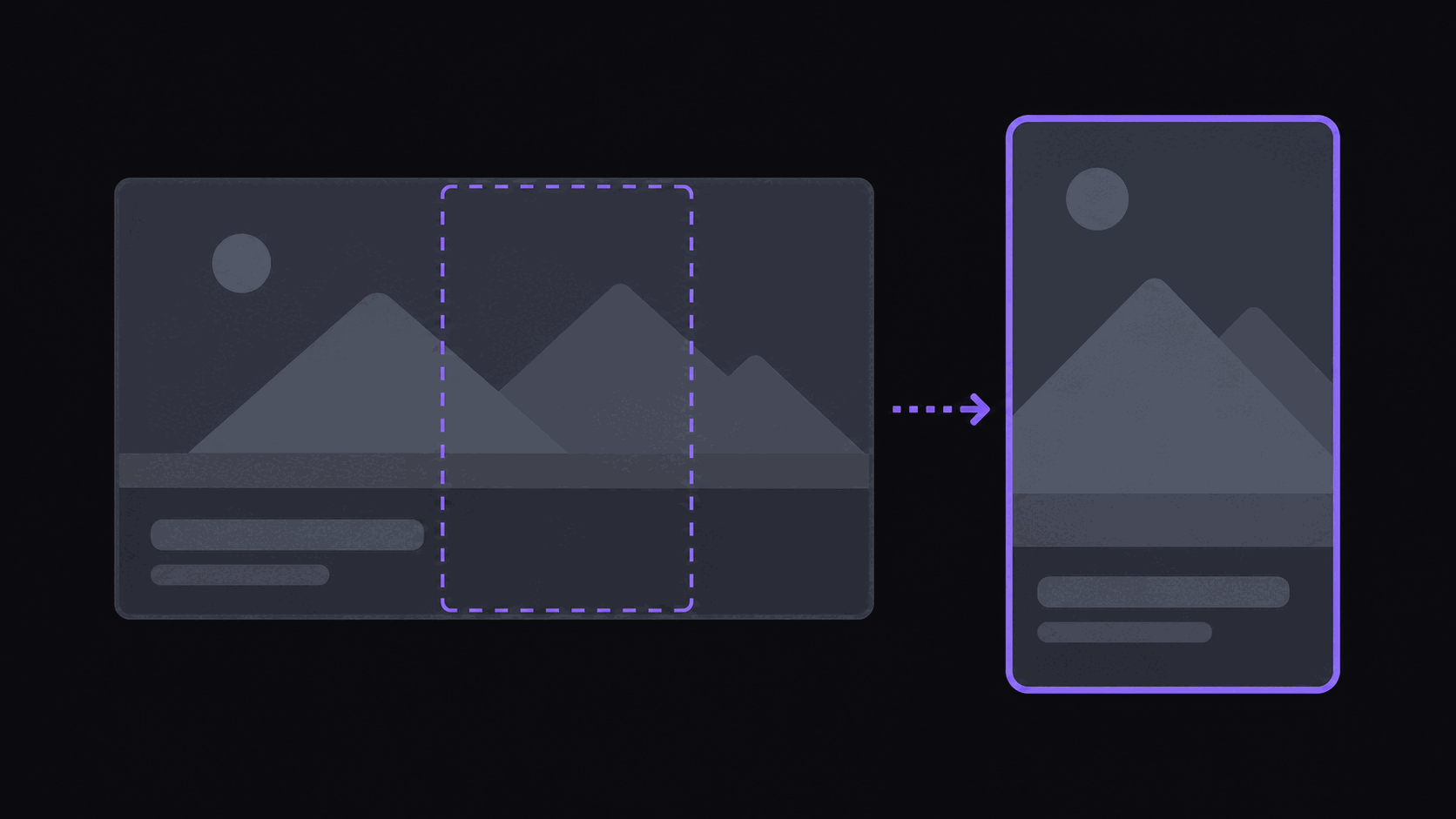
Two Seconds Is All a Letterboxed Clip Gets
Post a 16:9 clip straight to TikTok and the viewer sees a thin strip of video floating between two black bands. They do not consciously think "wrong aspect ratio." They just keep scrolling, because a letterboxed frame reads as recycled before a single word lands.
That is the whole problem in one sentence. Almost every good source for clipping — YouTube uploads, Twitch and Kick VODs, webinar recordings, conference talks — is shot 16:9 or wider. Every short-form destination wants 9:16. Something has to give up 60% of the frame, and the only question is whether you choose what gets cut or let a naive crop choose for you.
If you want the vocabulary, reframing is the umbrella term for that conversion: cropping, panning, scaling, and sometimes splitting the frame so the important part survives at portrait dimensions.
The Three Ways to Get to 9:16, and What Each One Costs You
Static center crop. Fastest, dumbest, occasionally correct. You take the middle 9:16 slice and ship it. It works for a single presenter who stands still in a centered frame — a lecture, a locked-off talking head. It fails the moment anyone moves, and it fails hard on interviews where two people sit on opposite thirds of the frame: you end up with a clip of the space between their shoulders.
Manual keyframing. You set crop positions at points in time and let the editor interpolate between them. This gives the best result and it is the reason experienced editors still open a timeline. It also takes real minutes per clip. Reframing a 45-second clip with four subject changes is a five-to-ten minute job once you include the scrub-back-and-check pass. At three clips a week, fine. At forty, it is your whole evening.
Automatic subject tracking. The crop window follows whoever is talking or moving. You give up some control and get back nearly all of the time. The failure modes are specific and worth knowing: it can drift toward a bright HUD element in gaming footage, it can hunt back and forth when two speakers overlap, and it can snap when someone leaves and re-enters the frame.
There is no universally right answer. If you publish a handful of hero clips a month and the framing is part of your brand, keyframe them. If you publish daily across several source channels, tracking is the only option that survives contact with your calendar. Manual editing versus AI clipping breaks the time math down further.
Footage That Breaks Simple Cropping
Gaming with a facecam. Two things matter and they sit in opposite corners: the gameplay and the streamer's reaction. A single crop has to sacrifice one. The fix is a split layout — facecam stacked over gameplay, each scaled to fill its half of the vertical frame. AutoClip applies that layout automatically on gaming sources, and Scale-plan accounts can use multi-region layouts to place more than one area of interest in the same portrait frame.
Two-person podcasts. A wide two-shot has both hosts near the frame edges. Center cropping gives you neither. What you want is the crop following whoever is currently speaking, cutting on speaker changes rather than every few seconds. That reads like a real edit because it is what a human editors would do.
Screen shares and slides. Text sized for a 16:9 monitor becomes unreadable at 9:16. Either scale the slide to fit the width and accept letterboxing on that section only, or skip screen-share segments as clip material entirely. Most of the time the second option is the right call — a clip of a spreadsheet is not a clip.
Anything with burned-in lower thirds. Chyrons, subscriber alerts, and stream overlays sit at the frame edges and get sliced in half by a portrait crop. Check the bottom 15% of your output before you publish; a half-cropped donation alert is the single most common tell of a lazy reframe.
Reframing Inside AutoClip
The reframe is not a separate step you run — it happens as part of generating clips.
- Paste a YouTube, Twitch, or Kick link, or upload a file. Sources up to 2 hours on Starter, 5 hours on Pro, 10 hours on Scale.
- Pick your output ratio. Every plan produces 9:16. Pro and Scale also export 1:1, 16:9, and 4:5, so one clip covers how long a Short or Reel can be in 2026s, feed posts, and LinkedIn without a second render.
- Wait about 5 minutes for a typical video. A three-hour stream takes proportionally longer — plan around it rather than watching the queue.
- Review the output. You get around nine clips from a typical video, each already cropped to portrait with the subject tracked, captions burned in, and a virality score with a five-criterion breakdown so you can see why a clip ranked where it did.
- Fix anything you disagree with in the timeline editor: nudge the crop, retime a caption, trim the head and tail.
Credits are the only thing being spent, and one credit equals one source minute. Livestream sources are the exception worth knowing about — for Twitch and Kick only the top highlight segments get processed, so a multi-hour stream usually costs between 35 and 90 credits rather than its full runtime. Starter includes 200 credits a month, Pro 500, Scale 1200. Full details are on the pricing page, and the video reframer page shows the output side by side.
Five Things That Only Show Up After You Post
The subject is centered but the action is not. Tracking follows faces. In a sports clip or a gameplay moment, the thing worth watching may be nowhere near a face. Check the crop on action-heavy clips specifically.
Captions collide with the platform UI. TikTok's right-hand button rail and bottom caption area eat into the frame. Keep burned-in text inside the middle 70% vertically. Our caption guide covers safe zones in more detail.
You upscaled a 480p source. Reframing a 16:9 clip to 9:16 means using roughly a third of the horizontal pixels. Start from 1080p where you can. A 720p source survives; a 480p archive turns to mush.
Every clip uses the same crop rhythm. If forty clips in a row hold on a static center crop, the channel reads as automated. Mixing in punch-ins and speaker zooms — see the zoom and punch-in guide — is what makes a feed look edited.
You never watched one on a phone. Everything looks fine on a 27-inch monitor. Send yourself three clips and watch them the way your audience will, thumb on the screen, ready to scroll.
Frequently Asked Questions
9:16 at 1080x1920 for all three. It fills the screen on every modern phone and is what each platform's player is built around. 4:5 is worth testing for Instagram feed posts specifically, and Pro and Scale plans export 9:16, 1:1, 16:9, and 4:5 from the same clip so you are not re-rendering for each destination.
For daily volume, automatic tracking is good enough and hand keyframing is not sustainable. For a small number of hero clips where framing is part of the joke or the reveal, keyframe them. A reasonable middle path: let the tool reframe everything, then hand-adjust the two or three clips you expect to carry the week.
Use a split layout rather than a single crop. Facecam on top, gameplay below, each filling its own portion of the vertical frame. AutoClip applies this automatically to gaming sources; Scale accounts can define multi-region layouts when more than two areas matter.
It reduces resolution, because you are keeping a portion of the original width and scaling it up to fill the vertical frame. Clips render at 720p by default, and you can switch any clip to 1080p Full HD from the export-quality picker (4K is a Scale feature and needs a 4K source). From a 1080p source the result is clean. From 720p it is acceptable. Below that it visibly softens, and no amount of processing fixes missing pixels.
You can, but you usually should not. A 40-minute video reframed to portrait is still a 40-minute video, and no short-form platform will distribute it. The reason reframing exists in a clipping workflow is that a clip is the deliverable and the aspect ratio is one property of it. If your goal is repurposing long content, start with [turning long-form into shorts](/blog/how-to-repurpose-long-form-content-into-shorts).
Related Articles
See also
Skip the Keyframing
Every clip AutoClip generates comes out reframed to 9:16 with the speaker tracked and captions burned in. Pro and Scale add 1:1, 16:9, and 4:5 from the same source.
Get started for free