AI Clip Maker for YouTube: How It Works in 2026
Updated
What an AI clip maker actually does
An AI clip maker takes a long video — a YouTube upload, a recorded stream, a podcast episode — and returns a set of short-form clips without you trimming a single frame. The process sounds simple but involves several steps running in sequence.
First, the tool transcribes the audio. Transcription quality determines nearly everything downstream: if the words are wrong, the moment-finding is wrong, the caption layer is wrong, and the export is wrong. Modern tools use Whisper or a proprietary speech-to-text model; the better ones run word-level timestamps so they can cut cleanly at sentence boundaries rather than mid-word.
Second, the transcript is scored. Scoring models vary significantly between tools. Some look for filler words and silence. Others score for topic density, sentiment shifts, or signals that a human is about to make a quotable claim. The most sophisticated models are trained on engagement data — they have seen millions of social posts and learned which patterns in a transcript correlate with likes and watch-through.
Third, clips are rendered. The tool selects a start and end time, reframes the source footage to 9:16 (or whatever aspect ratios you need), places captions on the vertical frame, and exports a finished file. Reframing is the step that most separates tools at this point: a face-tracking reframe keeps the speaker centered even as they move; a naive crop just picks a fixed region and cuts off ears.
That three-step chain — transcribe, score, render — is what every tool in this category does. What differs is where each step runs, how fast it completes, and how accurately it picks the moments you would have chosen yourself.
From YouTube specifically, the workflow typically starts with a URL. You paste the link, the tool downloads the audio track (or the full video if it needs visual analysis), and processing starts. Turnaround varies from under five minutes to over an hour depending on the tool's infrastructure and the length of the source.
One thing to set realistic expectations on before you start: an AI clip maker selects moments based on what has worked across a training corpus. It does not know your audience, your channel context, or which inside reference your community finds funny. The output is a starting point — genuinely useful and meaningfully faster than editing by hand, but not a finished product that bypasses your judgment entirely.
Why YouTube is the hardest source to clip from
YouTube videos present a specific challenge that makes them harder to clip from than, say, a podcast recording or a recorded interview.
The first challenge is length variance. A YouTube video might be seven minutes, forty-five minutes, or four hours. Moment-finding algorithms that work well on a 30-minute video don't necessarily work at the same quality on a four-hour gaming VOD where the energy varies dramatically across the runtime. The better tools adjust scoring sensitivity to the length and type of content; the weaker ones apply the same model to everything and produce worse results on longer material.
The second challenge is audio complexity. Many YouTube videos feature background music, sound effects, multiple speakers, and audio that was produced for a horizontal screen rather than a vertical clip. Transcription accuracy drops in the presence of music beds or heavy reverb. If the source video has a podcast-style vocal track without music, transcription is typically excellent. If it's a gaming video with commentary over in-game audio, you may get messier results.
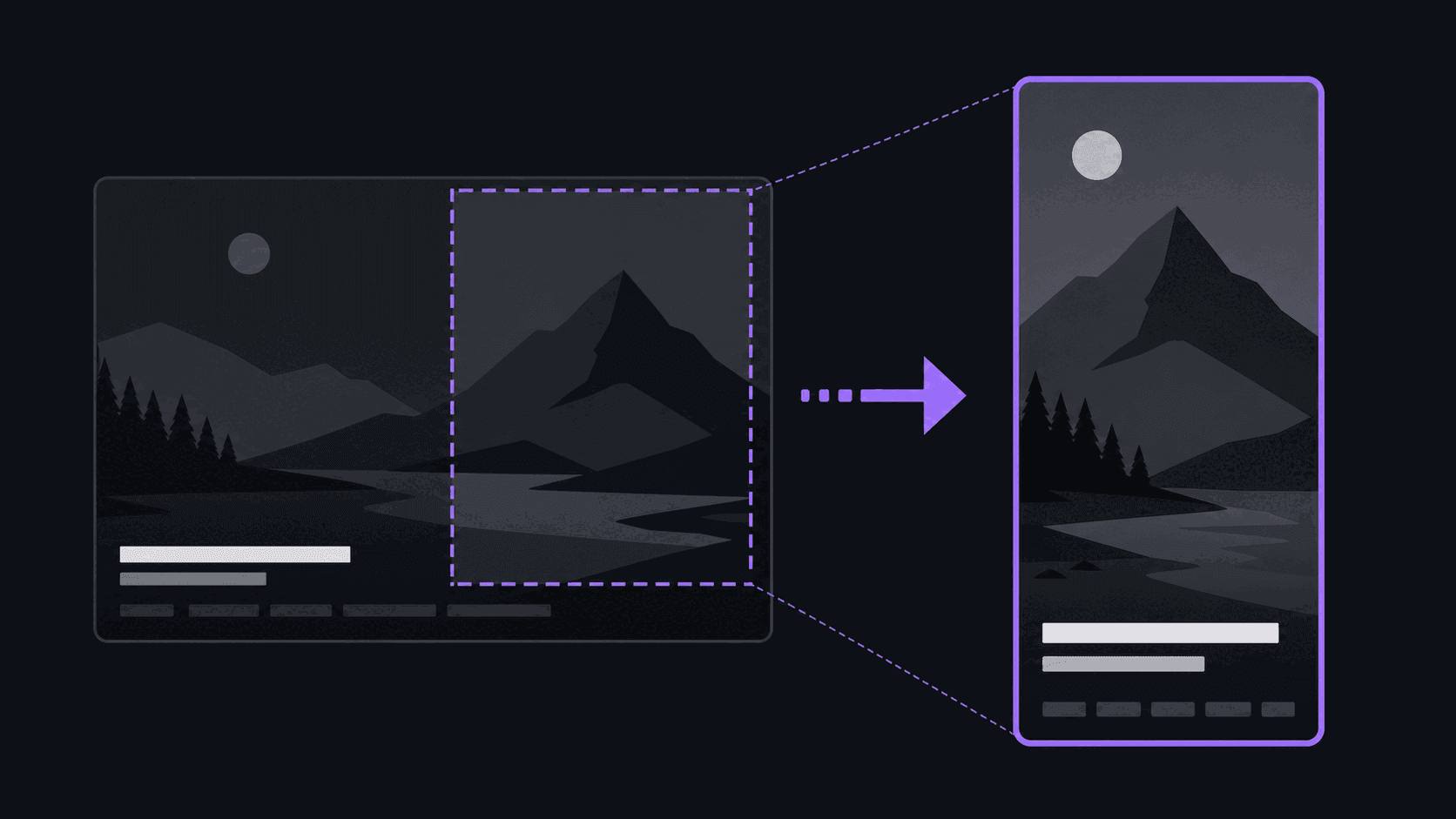
The third challenge is the 9:16 reframe. YouTube is native 16:9. A 9:16 reframe of 16:9 footage crops out roughly half the horizontal frame. If the source video features wide shots, multiple speakers in frame simultaneously, or text overlays in the safe zones of the original aspect ratio, the reframe will look awkward unless the tool applies face tracking or scene detection to decide where to crop.
None of these challenges are blockers — AI clip makers handle YouTube footage well in practice. But understanding them helps you know when to expect the best results (talking-head, podcast-style content with clean audio) and when to inspect the output more carefully (complex multi-person recordings, VODs with heavy background audio, or videos that were shot in a style where the wide frame matters).
What to look for in an AI clip maker
Choosing an AI clip maker comes down to a few criteria that matter more than the feature marketing suggests.
Transcription quality first. Ask the tool to clip a video where you already know exactly what was said. Compare the caption output against the actual words. Tools that transpose words, drop sentences, or hallucinate phrases will produce clips that say the wrong thing — which is worse than no captions.
Reframe behavior. Look at a clip with a speaker who moves. Does the frame track them or stay fixed? Fixed-crop tools look like someone cropped a screenshot; tracking tools look like vertical content. For talking-head content, tracking is nearly always worth it.
Output resolution. Confirm what resolution the clips deliver at your plan level. Some tools default to 720p and charge more for 1080p. For YouTube Shorts, 1080p is expected by the algorithm and by viewers; lower resolution is a subtle quality signal that the platform and audience both notice.
Yield per video. How many clips does the tool return? More is not always better — a tool that returns thirty clips where twenty-five are mediocre wastes your review time. But a tool that returns two clips per video limits your options. Aim for a yield that gives you real choices without a discard pile that dominates the output.
Posting integration. A clip on your hard drive is one step away from a post. A clip that can be scheduled to TikTok, YouTube Shorts, and Instagram how long a Short or Reel can be in 2026s from the same interface is genuinely faster and meaningfully more likely to actually get published. The bottleneck in most creator workflows is not generating clips; it is getting them posted. Tools with built-in scheduling close that gap.
Credit or minute math. Every tool has a pricing model. Understand whether you are paying per finished clip, per minute of source video, or per month with a cap. Per-minute pricing rewards efficient clipping; per-clip pricing rewards quality selection; monthly caps reward regular use. Run your expected volume through the model before you subscribe.
How AutoClip handles YouTube as a source
AutoClip is built specifically around YouTube as a primary source. You paste a YouTube URL — public video, playlist, or channel — and AutoClip handles the download, transcription, and moment-finding without requiring you to download anything locally first.
Transcription runs through Groq's Whisper large-v3 model, which delivers word-level timestamps alongside the text. Those timestamps are what make the caption layer accurate: captions sync to the actual word timing rather than to an estimated average speaking rate. The same transcript feeds the moment-scoring layer, which evaluates density, engagement markers, and sentence structure to score each potential clip window.
Reframe uses face-tracking by default. The vertical frame tracks the primary speaker throughout the clip, which means the output looks like content that was shot vertically rather than content that was cropped from a widescreen source.
For a standard YouTube video, the end-to-end time from URL paste to finished clips is roughly five minutes. Clips land in the dashboard with individual scores. You can review them, adjust start and end points, change captions, and then post to connected accounts directly or export for use elsewhere.
One important boundary: AutoClip clips from YouTube videos that are publicly available. It does not access private or unlisted videos, and it does not scrape content that the channel owner has restricted. The tool is designed for content creators clipping their own material or licensed material — not for redistributing other people's videos without permission.
Getting the best results from YouTube clips
The single best thing you can do to improve AI clip quality from YouTube is choose source material that was made for AI clipping to work well on — or adjust your recording practice so future material is easier to clip.
Talking-head content with a clean vocal track and minimal background music consistently produces the best AI-generated content clips. The speaker is in the frame, the audio is clear, and the camera is mostly stable. Moment-finding works well because the transcript is accurate and the content structure is clear.
For gaming or commentary content, the key variable is how distinct the commentary track is from the background game audio. Recording commentary on a separate track — which most recording software supports — lets you process the vocal track in isolation before sending it to the clip maker.
For podcast clips, the biggest lever is speaker segmentation. If your tool supports multi-speaker transcription, it can label who said what, which lets you cut to the moment the key claim was made rather than cutting slightly early or late.
For any content: the better the source audio quality, the better the output. A video recorded with a decent USB microphone in a quiet room will produce noticeably better AI clips than the same content recorded on a phone in a reverberant space. This is not about studio-quality production — it is about intelligibility, which is the threshold that matters for transcription.
Frequently Asked Questions
Yes. Most modern AI clip makers accept a YouTube URL as the starting point — you paste the link and the tool handles the download, transcription, and moment-finding. The alternative is uploading a local video file, which requires you to download the video yourself first. URL-based processing is faster and the standard workflow on most tools.
It varies by tool and video length, but a typical YouTube video returns between four and fifteen clips. Yield is not a fixed number — a tool may return more clips from a high-energy twenty-minute video than from a slow-paced forty-minute one. What matters is that the clips returned are ones you would actually consider posting, not raw clip count.
Somewhat. YouTube videos are typically native 16:9, which requires a 9:16 reframe for short-form platforms. Videos recorded in studio conditions with clean audio transcribe more accurately than recorded streams or videos with heavy background sound. The underlying AI process is the same; source audio and video quality affect the output quality.
It depends on the tool and your subscription tier. Some tools default to 720p across all plans and charge for 1080p exports. Others deliver 1080p at mid-tier and reserve 4K for enterprise plans. For YouTube Shorts, 1080p vertical at 1080x1920 is the standard expectation. Check the resolution at your specific plan level before subscribing.
Usually not for content that is ready to post, but light editing is common. Most creators review the clip start and end points, adjust any caption errors, and sometimes reorder or trim. The more important editing is curation — deciding which of the returned clips are worth posting. The AI selects; you still decide what represents your channel.
For your own videos or videos you have licensed, yes. AI clip makers are designed for processing content you have the rights to clip and redistribute. Using a clip maker on other creators' YouTube videos without permission is a copyright issue regardless of the tool — the AI does not change the underlying rights situation.
Related Articles
See also
YouTube links to finished clips in minutes
Paste a YouTube URL, AutoClip transcribes it, finds the highest-scoring moments and exports vertical clips with captions — no editing required.
Get started for free